
Skip to content

Client project · Restaurant · Anonymised

Make every table visit an opportunity to serve better.

We built this for a restaurant that wanted ordering, service requests and visibility of the floor in one system — without making the floor team's night harder.

The problem

Guests wave for water, wait to order another round and ask for the bill, while captains keep track of every table from memory. The owner sees the night only when the bills are closed.

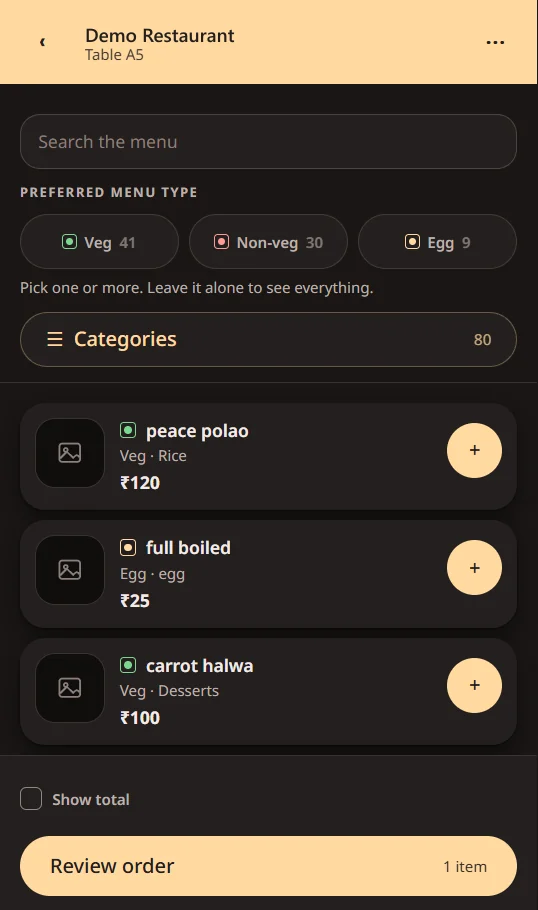
A restaurant's QR menu on a phone, with veg, non-veg and egg filters and dishes that can be added to the order

Screenshots are real screens from the system, with every name, figure, logo and QR code replaced by fictional data.

What We Built

  • A QR menu for each table, with veg, non-veg and egg filters, search and categories
  • Several rounds of ordering on one bill, paid at the end, with notes for the kitchen
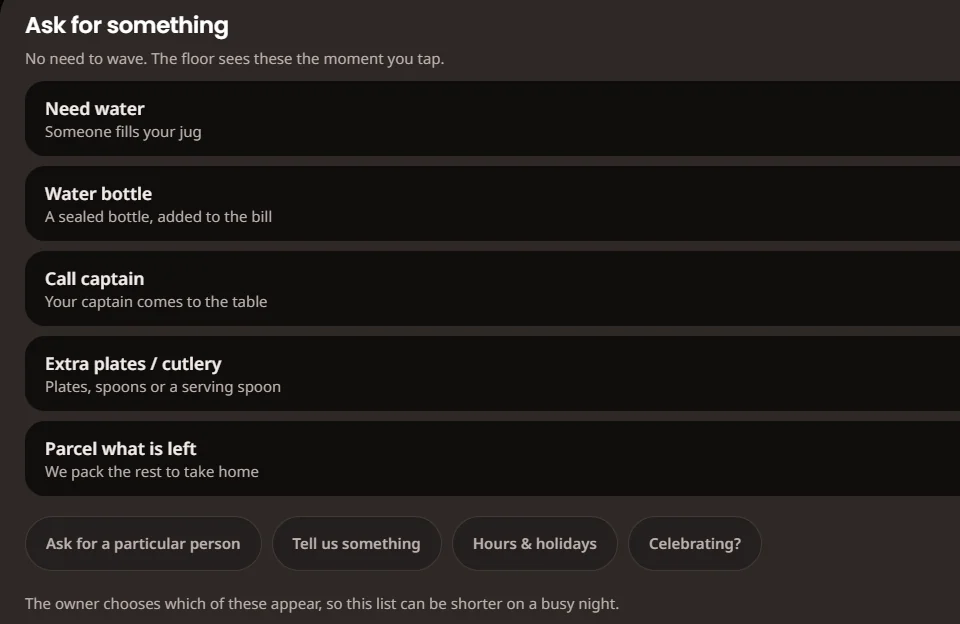
  • Guest requests — water, the captain, extra cutlery, packing what is left
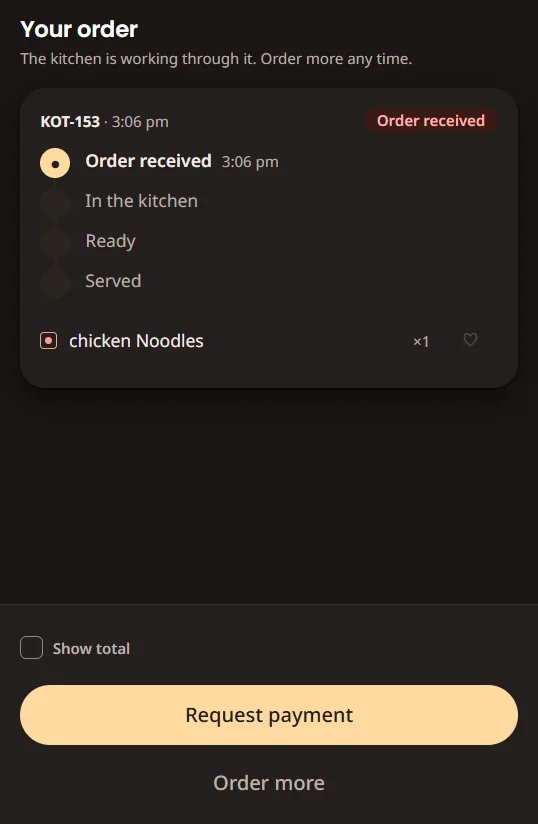
  • Order status the guest can follow: received, in the kitchen, ready, served
  • An optional game while the order cooks, ending in add-on suggestions
  • A captain view on the phone: tables, requests and kitchen tickets
  • An owner dashboard: today's figures, the floor, live orders, menu and reports
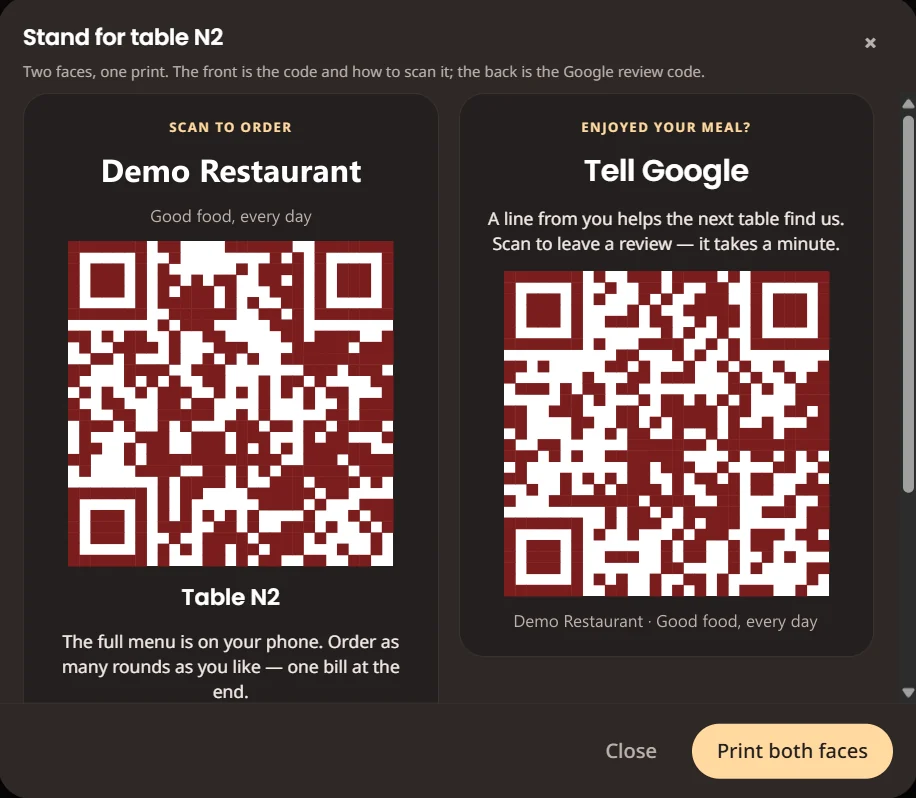
  • Printable two-sided table stands — the menu code on the front, a review code on the back

How It Works, Step by Step

  1. Step 1: Guests scan the code on the table

    Each table gets a printable two-sided stand. The front opens that table's menu; the back asks for a Google review.

    The table-stand print screen: a scan-to-order QR code on the front and a review QR code on the back
  2. Step 2: Browse and order — in as many rounds as they like

    Filters for veg, non-veg and egg, a search and categories. Every round goes on one bill that is paid at the end.

    The guest menu with food-type filters and dishes with add buttons
  3. Step 3: Ask for something without waving

    Water, the captain, extra plates or packing what is left. The owner chooses which requests appear, so the list can be shorter on a busy night.

    The guest's ask-for-something panel listing water, a water bottle, call captain, extra cutlery and packing leftovers
  4. Step 4: Follow the order

    The guest sees each stage — received, in the kitchen, ready, served — and can order more at any time.

    The guest's order screen showing the kitchen ticket at the 'order received' stage of four
  5. Step 5: Suggest what completes the meal

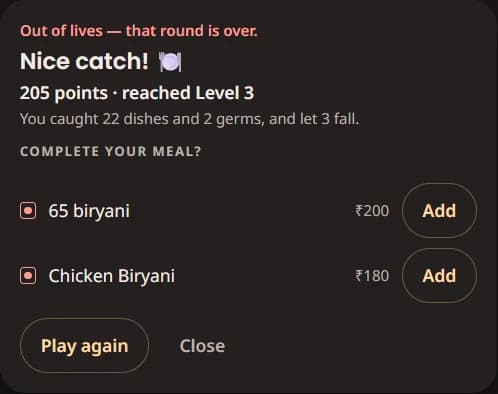
    While the food cooks, an optional mini-game ends with a few dishes the guest can add in one tap.

    The end of the in-order game, suggesting two dishes to complete the meal with add buttons
  6. Step 6: The captain gets the request on their phone

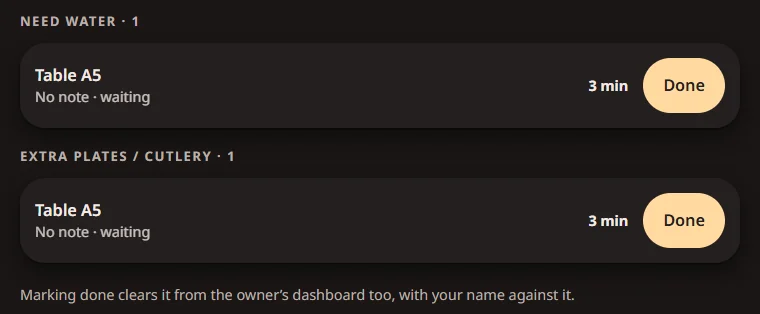
    Each request shows how long it has waited. Marking it done clears it for the owner too, with the captain's name against it.

    The captain's request list: two requests from one table, each waiting three minutes with a done button
  7. Step 7: The owner sees the whole floor

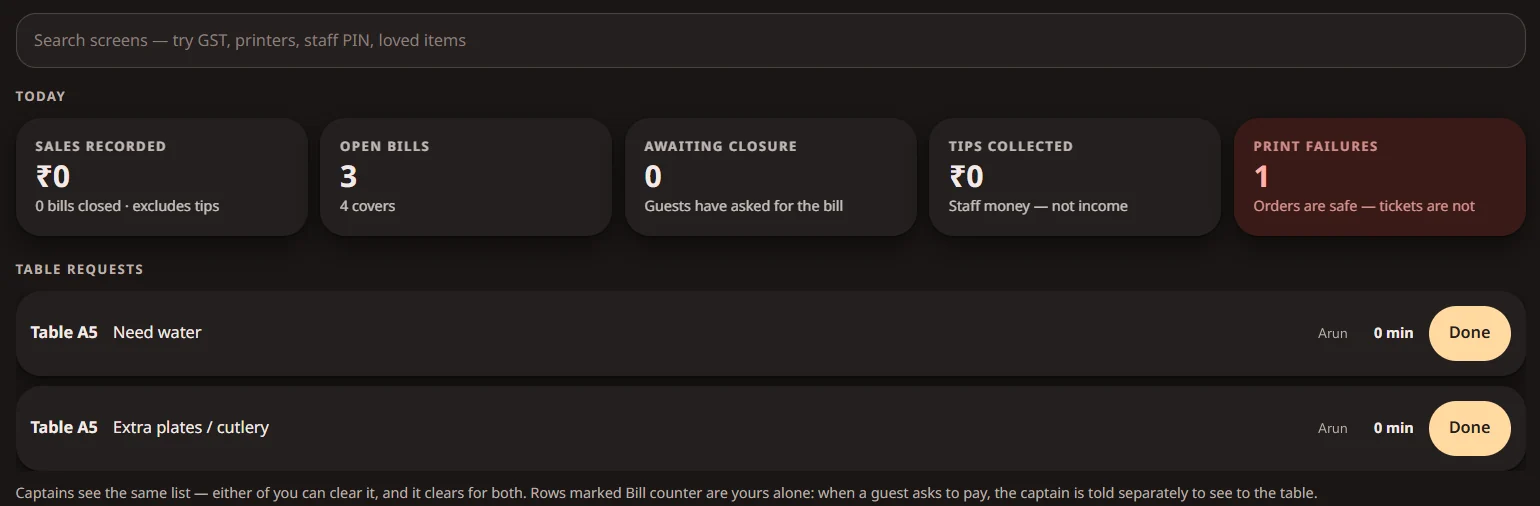
    Today's sales, open bills, guests waiting for the bill, tips kept separate from income, print failures and every open request — on one dashboard.

    The owner dashboard: today's sales, open bills, awaiting closure, tips and print failures, then the open table requests
  8. Step 8: Every table at a glance

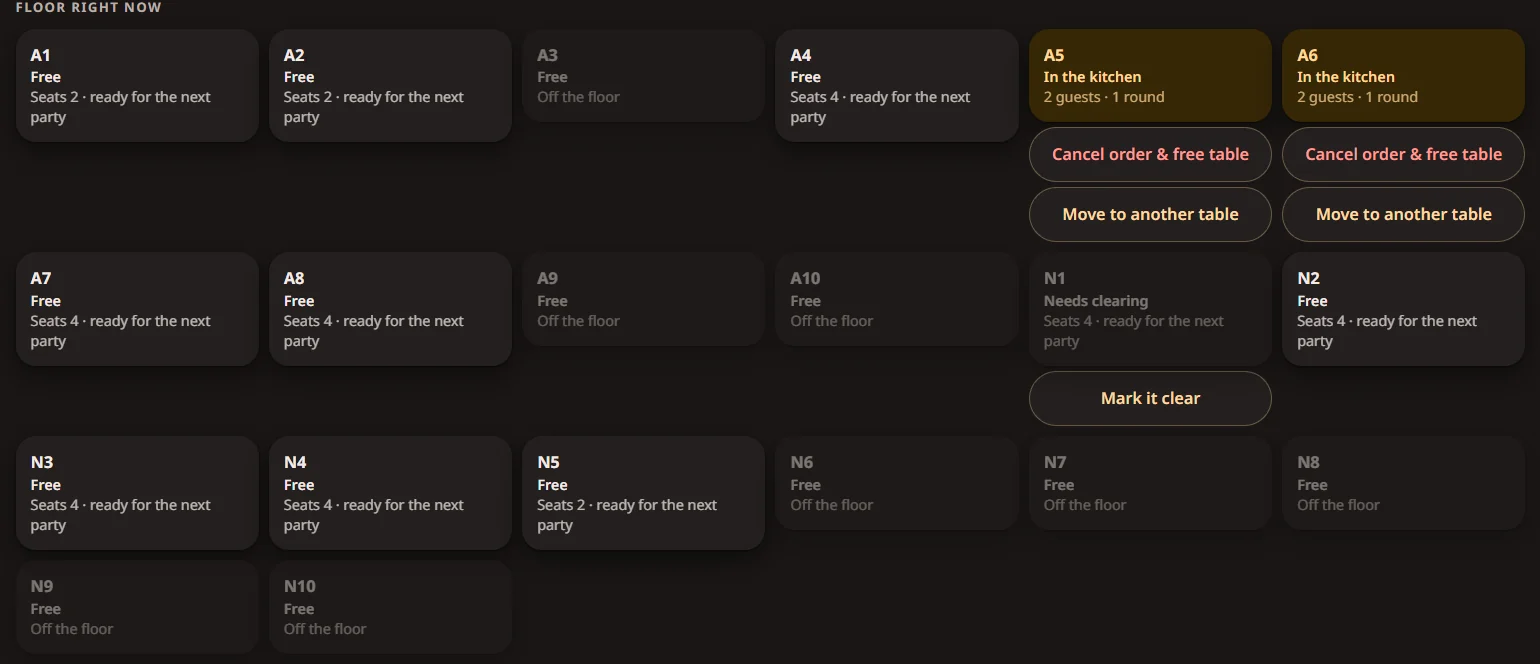
    A live floor map shows which tables are free, which are waiting on the kitchen and which need clearing — and lets the owner move or free a table.

    The floor map: tables marked free, in the kitchen or needing clearing, with move and cancel actions
  9. Step 9: Reports the owner can act on

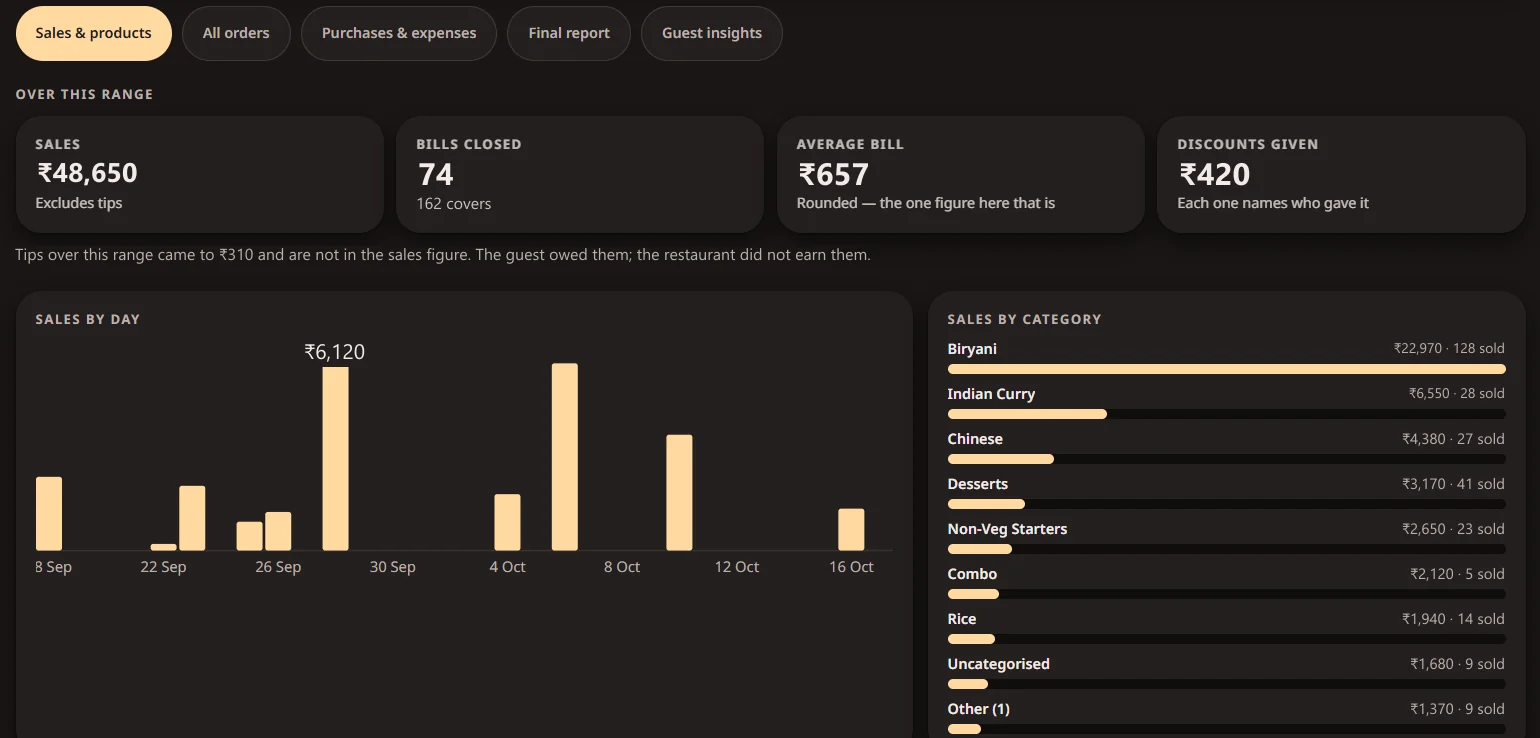
    Sales by day and by category, the average bill and discounts given. The figures in this screenshot are fictional.

    The sales report: totals, bills closed, average bill and discounts, a sales-by-day chart and sales by category

Small details that keep the floor honest

  • A request marked done clears for both the captain and the owner, with the name of whoever cleared it.
  • A reprinted kitchen ticket is stamped REPRINT, so the kitchen knows it is not a second order.
  • Tips are kept out of the sales figure — the guest owed them; the restaurant did not earn them.
  • If a kitchen printer fails, the order is still safe and the ticket can be retried.

Have a Similar Problem? Let's Talk It Through.

Your workflow will not be identical, and it does not need to be. Tell us what is slow, manual or missing, and we will tell you honestly whether something like this would help.

More use cases

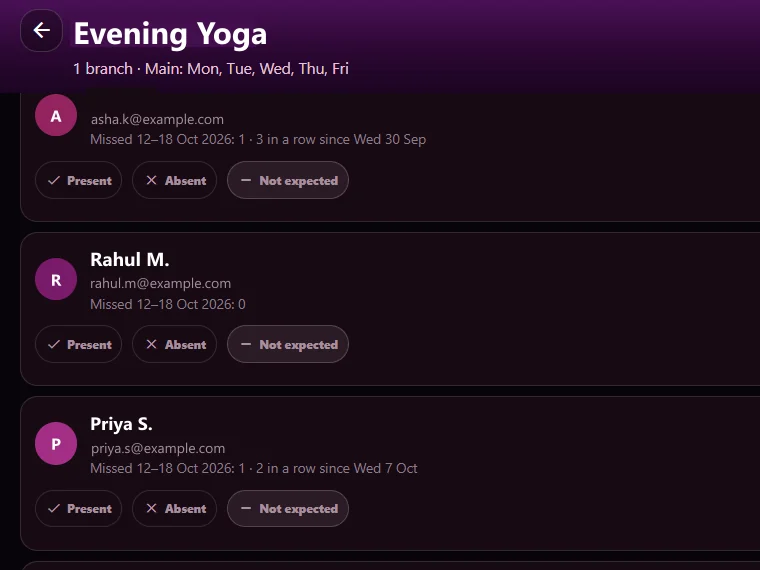
  • A course's attendance list showing each member's missed sessions and present, absent or not-expected marks

    Client project · Fitness academy · Anonymised

    Turn attendance records into proactive member engagement.

    The problem: Academies and fitness studios often notice repeated absences only after a member has already drifted away.

    What we built: Online-class attendance is imported, members who miss a set number of sessions are flagged, and course-wise reminder emails go out — with a record of every email sent, bounced or excluded.

    See how it works: Turn attendance records into proactive member engagement.
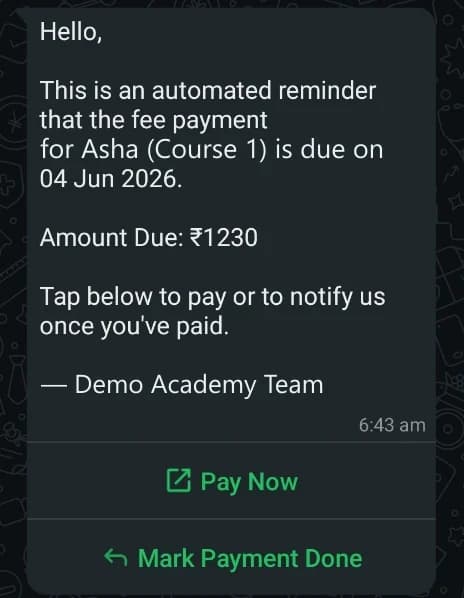
  • An automated WhatsApp fee reminder with the amount, the due date and Pay Now and Mark Payment Done buttons

    Our own product · UniqBrio

    Spend less time chasing fees.

    The problem: Manual follow-ups make it hard to keep track of due dates, payment status and new enquiries across courses.

    What we built: Course-wise payment tracking, WhatsApp reminders with a pay link, and a simple online path from enquiry to enrolment.

    See how it works: Spend less time chasing fees.