
Skip to content

Digital Solutions Built Around Your Business

You Focus on Growth. We Build the Digital Tools That Keep Your Business Moving.

Custom apps, automation, integrations and better internal systems — built around the way your business actually works.

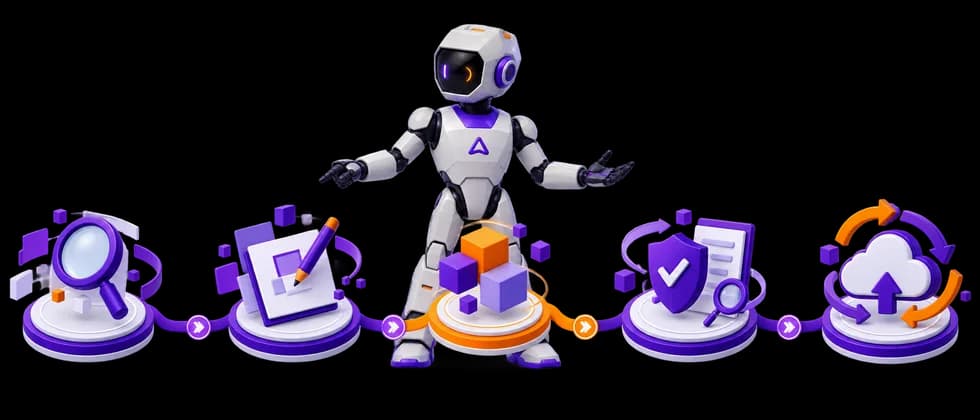
Our process:UnderstandDefineBuildImprove

Three business professionals gathered around a laptop, talking through a workflow on the screen
Chats, spreadsheets and paper → one clear workflow

Our approach

We Don't Start With Technology. We Start With the Problem.

Every business has things that take more time, people or effort than they should. But the most visible problem is not always the most important one to solve.

So we start by understanding how the work actually runs today — then decide what is worth changing, and whether technology is the right answer at all.

Before we build anything, we identify what is actually worth fixing.

Not everything that is annoying is expensive, and not everything expensive is obvious. We look at where the real cost sits before deciding what to build.

  • Time

    Work that takes hours because of how it is done, not because of what it is.

  • Money

    Cost that accumulates quietly — rework, duplication, or paying people to move information.

  • Effort

    Steps that need constant attention, chasing or checking to keep moving.

  • Operational capacity

    Work the business cannot take on because the current way of running it has no room left.

  • Data visibility

    Decisions that wait because the information needed to make them is missing or scattered.

How we work

From Business Problem to Working Solution.

  1. 01

    Understand

    Find out where the time, money or capacity is actually going, and decide what is worth fixing first.

    • Understand
    • Measure
    • Prioritize
  2. 02

    Define

    Shape the solution and confirm it is the right one before it is fully built.

    • Prototype
    • Validate
  3. 03

    Build

    Design and build it properly, and test it against what the business actually needs.

    • Design
    • Build
    • Test
  4. 04

    Improve

    Put it into real use, see how it behaves, and keep improving it as the business changes.

    • Launch
    • Learn
    • Improve

You do not need to know what technology you need. You need to know what you want to improve.

Practical solutions to real business problems

Your Everyday Business Challenges Deserve Better Systems.

Tell us where your business loses time, money or opportunities. We'll help you evaluate a practical solution. Here are six we have built.

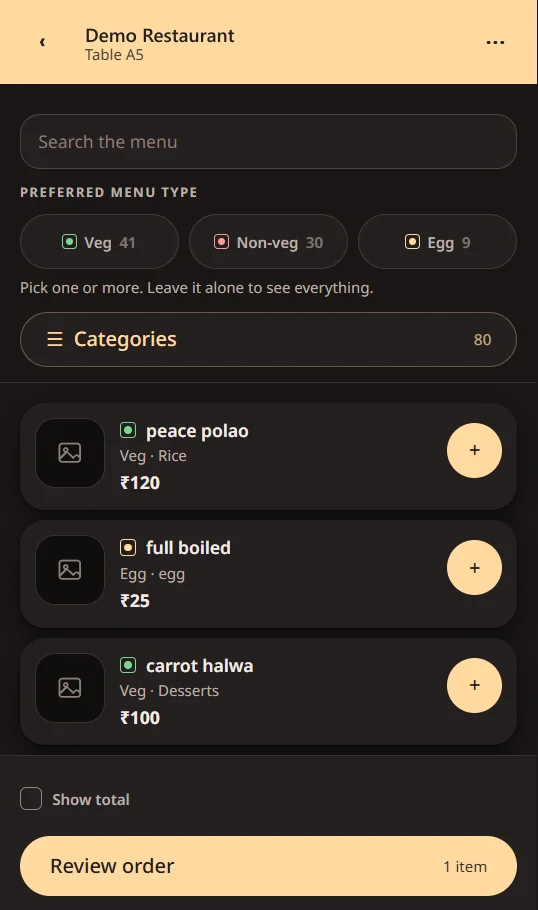
  • A restaurant's QR menu on a phone, with veg, non-veg and egg filters and dishes that can be added to the order

    Client project · Restaurant · Anonymised

    Make every table visit an opportunity to serve better.

    The problem: Guests need an easier way to browse, order and ask for service — without adding work for the floor team.

    What we built: A table-QR menu for ordering and service requests, with the floor team and the owner seeing the same requests the moment a guest taps.

    See how it works: Make every table visit an opportunity to serve better.
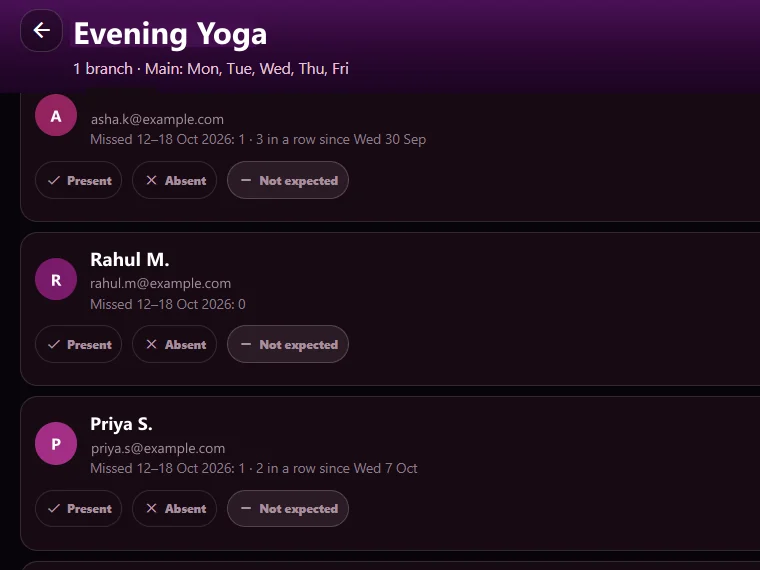
  • A course's attendance list showing each member's missed sessions and present, absent or not-expected marks

    Client project · Fitness academy · Anonymised

    Turn attendance records into proactive member engagement.

    The problem: Academies and fitness studios often notice repeated absences only after a member has already drifted away.

    What we built: Online-class attendance is imported, members who miss a set number of sessions are flagged, and course-wise reminder emails go out — with a record of every email sent, bounced or excluded.

    See how it works: Turn attendance records into proactive member engagement.
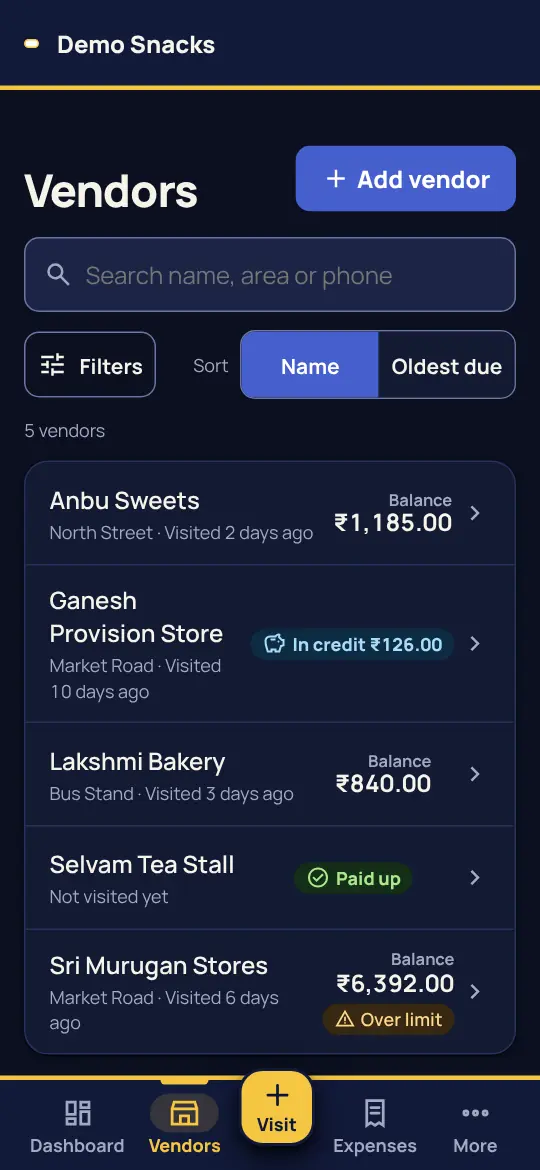
  • The owner's list of shops on a phone, each with its balance, a paid-up or in-credit tag and an over-limit warning

    Client project · Snack maker · Anonymised

    Every shop visit — returns, delivery and payment — in one go.

    The problem: A snack maker supplying local shops kept returns, deliveries and payments in a notebook. What each shop owed, which stock was expiring and whether the business made a profit were all guesswork.

    What we built: A phone app for the owner: one visit records returns, the new delivery and the payment, opens WhatsApp with a ready summary and a UPI pay link, and shows balances, expenses and profit.

    See how it works: Every shop visit — returns, delivery and payment — in one go.
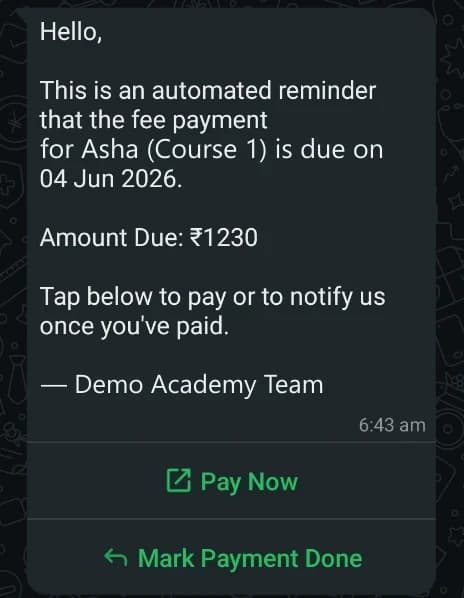
  • An automated WhatsApp fee reminder with the amount, the due date and Pay Now and Mark Payment Done buttons

    Our own product · UniqBrio

    Spend less time chasing fees.

    The problem: Manual follow-ups make it hard to keep track of due dates, payment status and new enquiries across courses.

    What we built: Course-wise payment tracking, WhatsApp reminders with a pay link, and a simple online path from enquiry to enrolment.

    See how it works: Spend less time chasing fees.
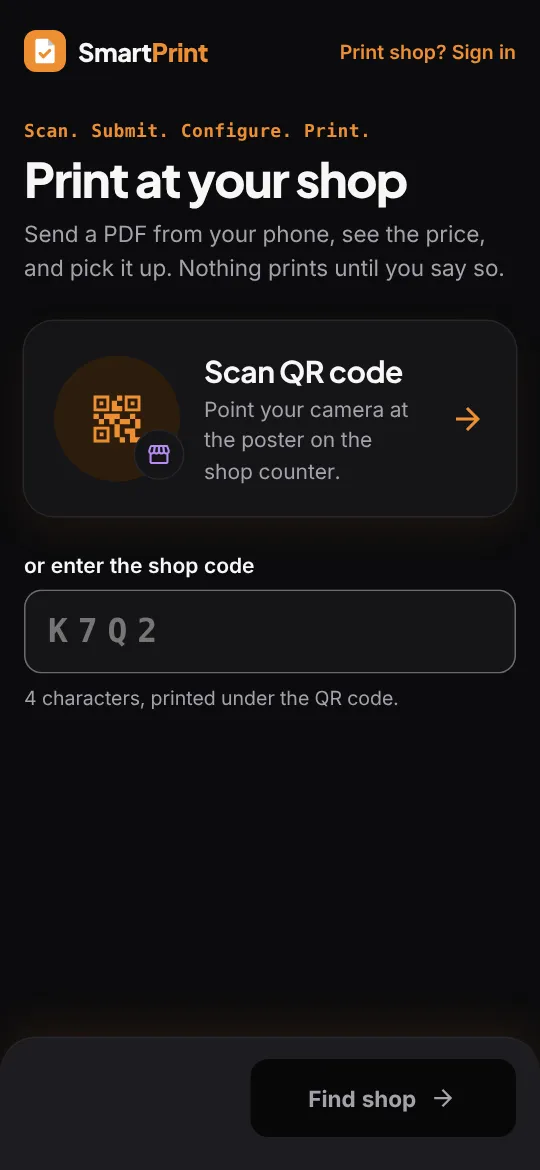
  • SmartPrint's start screen on a phone: scan the shop's QR code or enter its four-character shop code

    Our own product · SmartPrint

    Scan. Submit. Configure. Print.

    The problem: Print orders arrive on staff members' own WhatsApp and email. Each one means finding the file and asking how to print it, and customers' documents stay behind in personal chats.

    What we built: Customers scan the shop's QR code, upload a PDF, choose their print settings and see the price. The shop gets a confirmed, ready-to-print order.

    See how it works: Scan. Submit. Configure. Print.
  • Our own product · Relavya

    Private beta

    Remember everyone you meet. Follow up like you mean it.

    The problem: After an event you have cards, WhatsApp numbers and LinkedIn requests, but not what you talked about. A generic message feels awkward, so the follow-up waits and usually never happens.

    What we built: A private notebook of the people you meet at events. Save a person and one memory in seconds, then open a ready, personal follow-up in your own WhatsApp, LinkedIn or email.

    See how it works: Remember everyone you meet. Follow up like you mean it.

Client projects are shown without the client's name. Screenshots are real screens from the system, with every name, figure, logo and QR code replaced by fictional data. SmartPrint is shown with a demo shop and sample files; Relavya with its demo account's sample people and events.

Capability proof

We Don't Just Talk About Digital Transformation. We Build Our Own Products Too.

UniqBrio is an all-in-one digital platform built by our team for arts and sports academies. It brings together areas such as class management, student management, scheduling, payments, staff management and operations in one platform.

Building and evolving UniqBrio gives us practical experience in turning complex operational workflows into a working digital product.

To be precise about what this is: UniqBrio is a product we built and run ourselves. We show it as evidence of what we can build — not as a customer reference.

One platform, built by us

  • Class management
  • Student management
  • Scheduling
  • Payments
  • Staff management
  • Operations

Designed, developed and operated end to end — the same discipline we bring to client work.

What we build

Then We Build the Right Solution.

Once we know what is worth fixing, this is the shape the answer usually takes.

Custom Applications

Web and mobile applications built around your actual workflows.

  • Internal business applications
  • Customer portals
  • Field apps
  • Workflow systems
  • Scheduling systems
Explore Custom Applications

Automation

Remove repetitive manual work and connect processes.

  • Repetitive data entry
  • Document and report generation
  • Approval routing
  • Scheduled operations
  • Notification and follow-up flows
Explore Automation

Existing Software Improvements

Add missing capabilities without necessarily replacing the system you already use.

  • Missing modules and screens
  • Custom reporting layers
  • Workflow extensions
  • Data entry and validation aids
  • Bridging tools between systems
Explore Existing Software Improvements

Integrations

Connect systems that currently work separately.

  • System-to-system data flow
  • API integrations
  • Payment and messaging services
  • Accounting and ERP connections
  • Third-party service connections
Explore Integrations

AI & Intelligent Workflows

Use AI where it solves a real business problem — not simply because it is available.

  • Document and form understanding
  • Classification and routing
  • Drafting and summarising
  • Assisted search across your own information
Explore AI & Intelligent Workflows

Operational Visibility

Bring important business information into one place when decision-making is being slowed by missing or disconnected data.

  • Operational dashboards
  • Branch and team views
  • Status and exception views
  • Scheduled operational reports
Explore Operational Visibility

Why UniqBotz

Built Quickly. Built Properly.

Our speed comes from having a structured development process, reusable foundations and disciplined engineering practices — not from skipping important steps.

Focused solutions can be delivered in days or weeks, depending on scope — using our SDLC-based approach without skipping engineering, testing or review.

“Days or Weeks” Is a Scope Statement, Not a Sales Promise.

Anyone can promise speed before understanding the problem. Here is the honest version — what fits into days, what takes weeks, and what we will tell you takes longer.

  1. Days

    A focused tool

    One workflow, a small number of screens, a clear rule set. A job-assignment tracker, an approval flow, a shared operational form replacing a spreadsheet.

  2. Weeks

    A working application

    Several connected workflows, real user roles, integration with a system you already run, and reporting on top of it.

  3. Longer

    And we will say so

    Multi-department platforms, heavy migration from an existing system, or regulated processes take longer than weeks. We would rather scope that honestly than commit to a date we would miss.

Scope comes first, then the timeline. That order is the reason the timeline holds.

  • Structured SDLC

    A defined process from discovery through deployment and support.

  • Reusable Foundations

    Proven application patterns and components reduce unnecessary development time.

  • Business-First Thinking

    We start by understanding the process before deciding what technology is required.

  • Flexible Architecture

    Build new, extend existing or connect multiple systems depending on what makes sense.

Common questions

Questions Worth Asking Before You Talk to Anyone.

Do I need to know exactly what software I need?

No. Start with the business problem. We can help determine the appropriate digital solution.

We already have software. Can you still help?

Yes. We can extend existing systems, build missing modules, integrate systems or modernize parts of an application.

How quickly can you build an application?

It depends on scope. Focused business tools can sometimes be delivered in days, while larger applications may take weeks or longer. We define the scope before committing to a timeline.

Do you only build AI solutions?

No. We start with the business problem and use the appropriate technology — applications, automation, integrations, AI or a combination.

Do you replace existing software?

Not necessarily. If your current software works well in some areas, we can build around it and fill the gaps.

Can you work with companies outside India?

Yes, subject to communication, project requirements and commercial fit.

What Would You Improve If the Right Software Were Worth Solving?

Tell us about the process, system or workflow that needs improvement. We will help you explore what can realistically be built.

No technology specification required. Start with the problem.