Skip to content

Client project · Snack maker · Anonymised

Every shop visit — returns, delivery and payment — in one go.

We built this for the owner of a small snack-making business who delivers to local shops — bakeries, sweet stalls, tea stalls and provision stores — and collects payment on the next visit.

The problem

On every visit the owner takes back expired stock, drops a new delivery and collects what the shop can pay, often part cash and part UPI. In a notebook it is hard to see what each shop owes, which stock is about to expire, which shops are past their credit limit, and whether the business is making money once returns and expenses are counted.

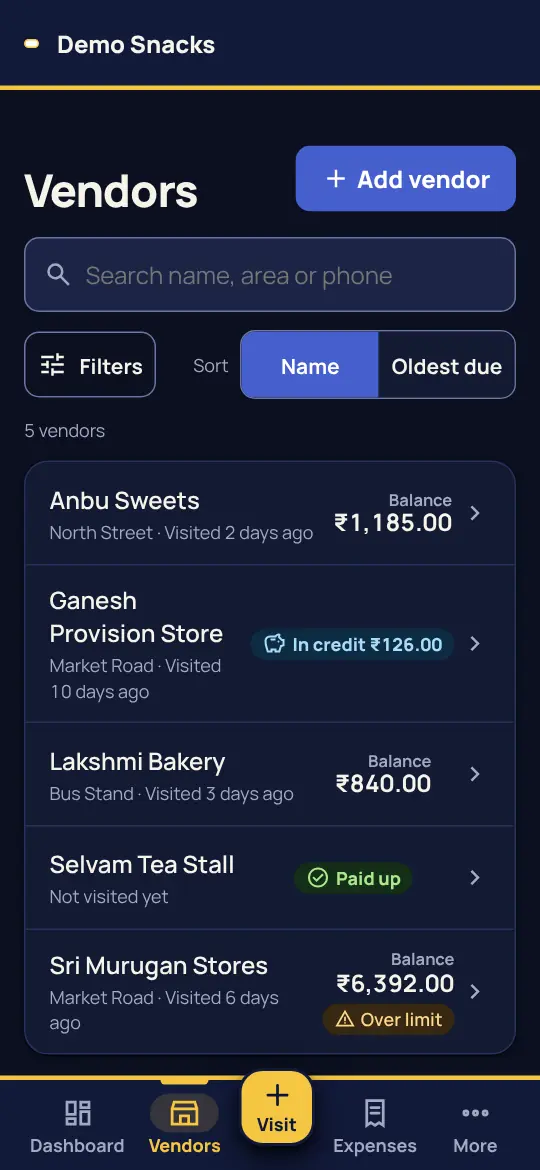
The owner's list of shops on a phone, each with its balance, a paid-up or in-credit tag and an over-limit warning

Screenshots are real screens from the system, with every name, figure, logo and QR code replaced by fictional data.

What We Built

  • A list of every shop with its balance, oldest unpaid bill and an over-limit warning
  • One visit that records returns, the new delivery and the payment together — each part optional, all saved at once
  • Returns listed with expired and expiring stock first, credited at the price the shop paid
  • Repeat the last delivery in one tap, with each shop's last price filled in and a warning when a price is below making cost
  • Split payments, part cash and part digital, with an optional discount to settle a small difference
  • A numbered visit summary PDF, sent from the owner's WhatsApp with a UPI “Pay” link
  • A credit-limit warning at the start of a visit, which warns but never blocks
  • Expenses, cash in hand and an owner dashboard: sales, returns, profit, and who to chase

How It Works, Step by Step

  1. Step 1: See every shop at a glance

    Each shop shows what it owes, when it was last visited, and whether it is paid up, in credit or over its limit.

    The shop list with balances, a paid-up tag, an in-credit tag and an over-limit warning
  2. Step 2: Open the shop before walking in

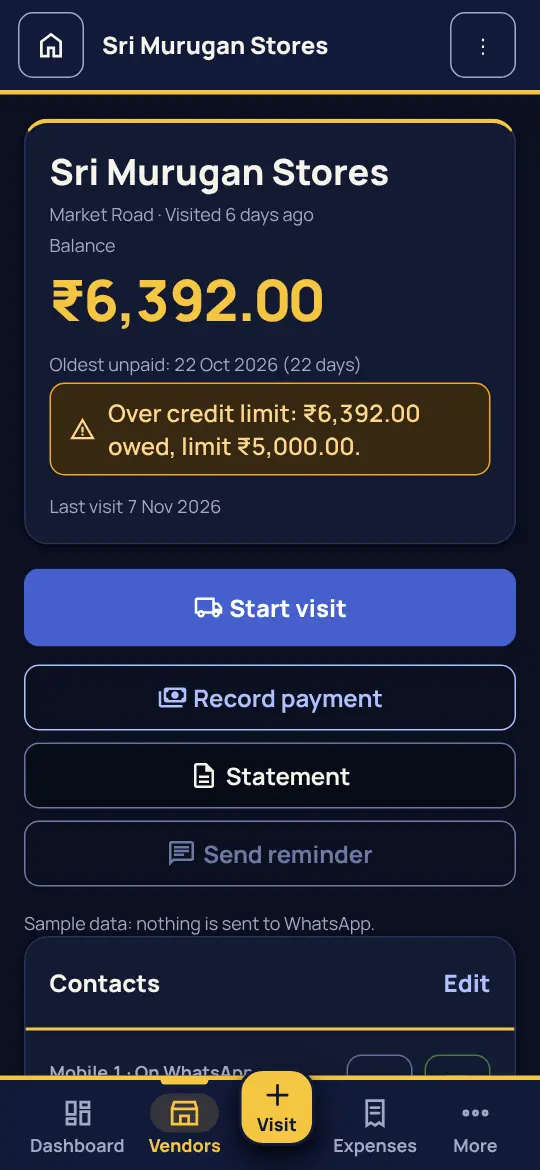
    The balance, the oldest unpaid bill and any credit-limit warning, with one tap to start the visit, record a payment or send a statement.

    A shop's page showing a balance of ₹6,392, an over-credit-limit warning and buttons to start a visit, record a payment or send a statement
  3. Step 3: Take back returns, expired stock first

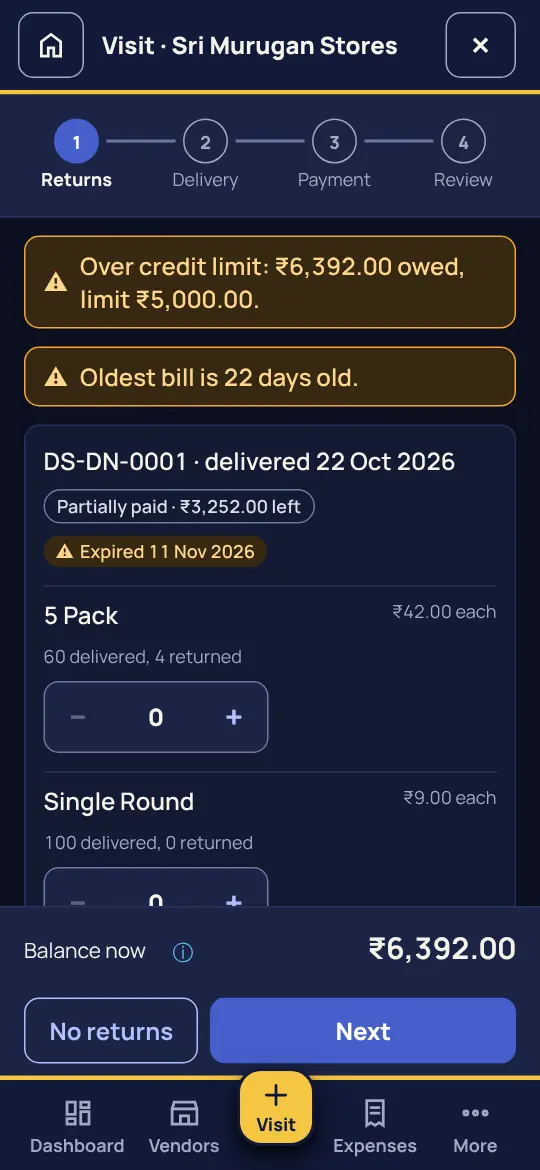
    Earlier deliveries are listed with expired and expiring packs at the top. Each return is credited at the price the shop paid.

    The returns step of a visit, listing earlier deliveries with an expired tag and a count for each pack
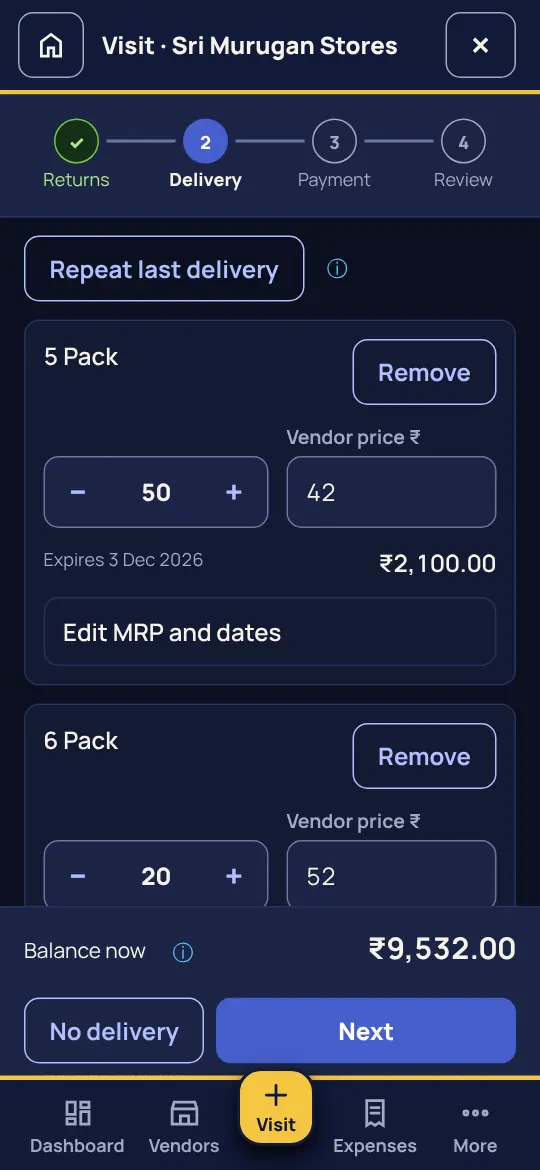
  4. Step 4: Repeat the last delivery

    One tap fills in the shop's previous order and prices. Every line stays editable, and the new balance updates as you go.

    The delivery step with a Repeat last delivery button, two product lines with quantities and vendor prices, and the new balance
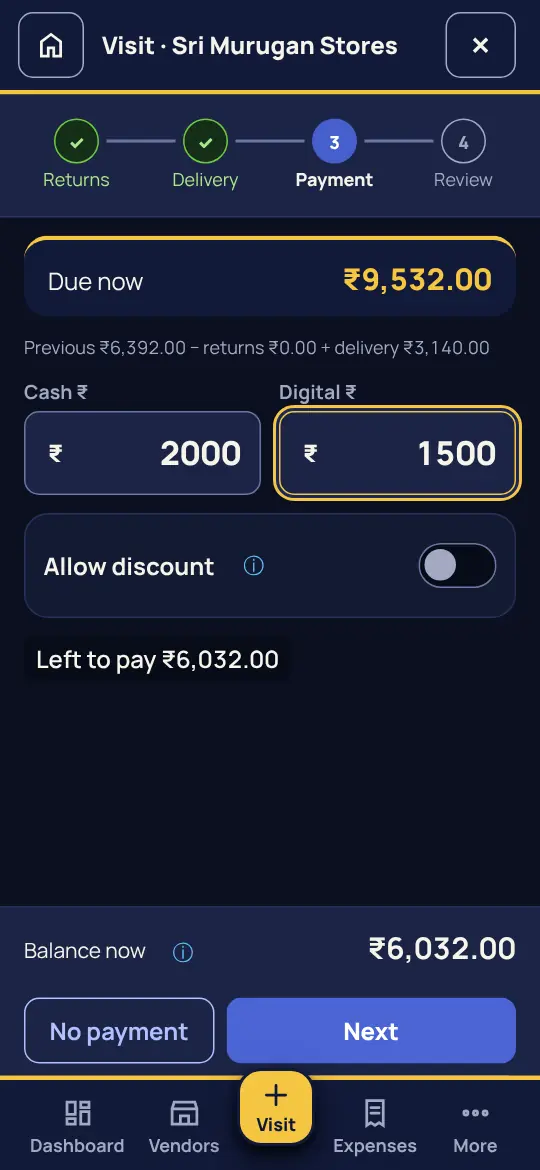
  5. Step 5: Collect cash, UPI or both

    A payment can be part cash and part digital. A small shortfall can be settled as a discount instead of carried forward.

    The payment step with ₹2,000 in cash and ₹1,500 digital entered, an Allow discount switch and the amount left to pay
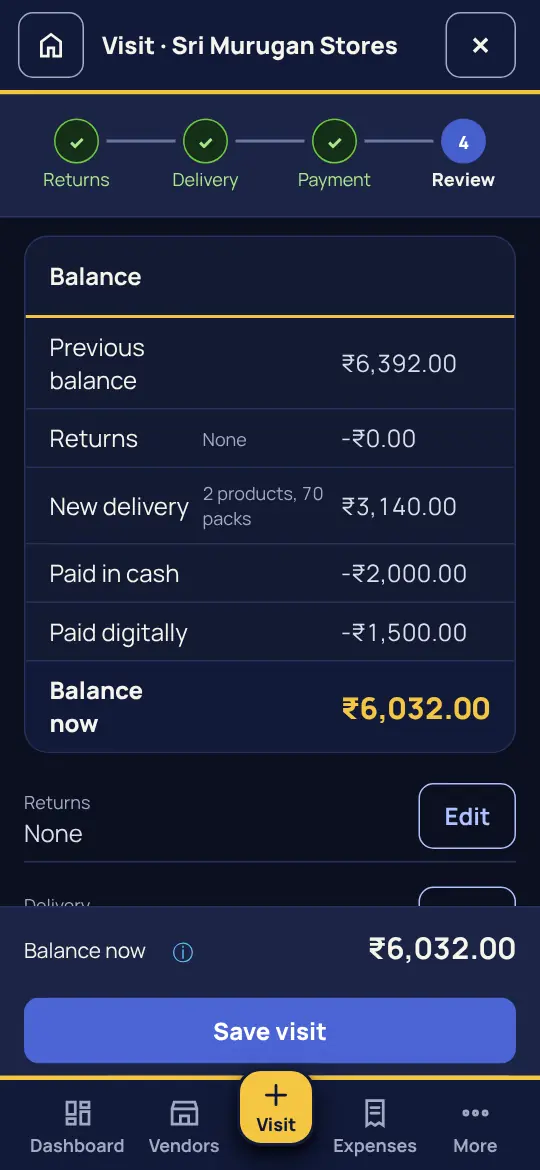
  6. Step 6: Check, then save once

    One review of returns, delivery and payment. The visit saves completely or not at all.

    The review step summarising the previous balance, the new delivery, cash and digital payments and the balance now
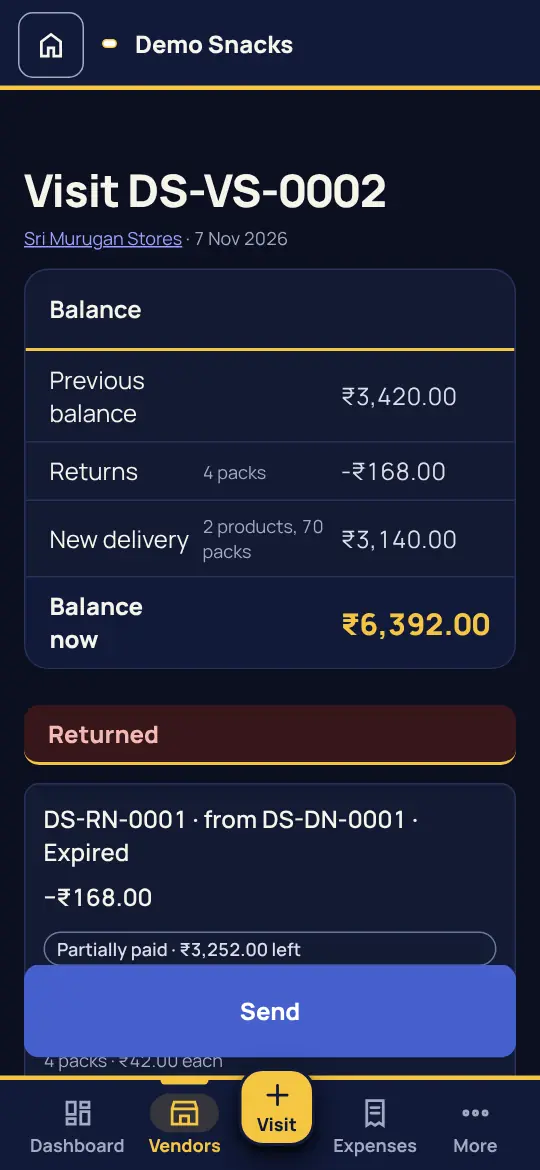
  7. Step 7: Send one summary on WhatsApp

    The visit becomes one numbered summary. Send opens the shop's WhatsApp chat with the amount, a PDF link and a UPI pay link.

    A saved visit summary with the balance before and after, the returned stock and a Send button
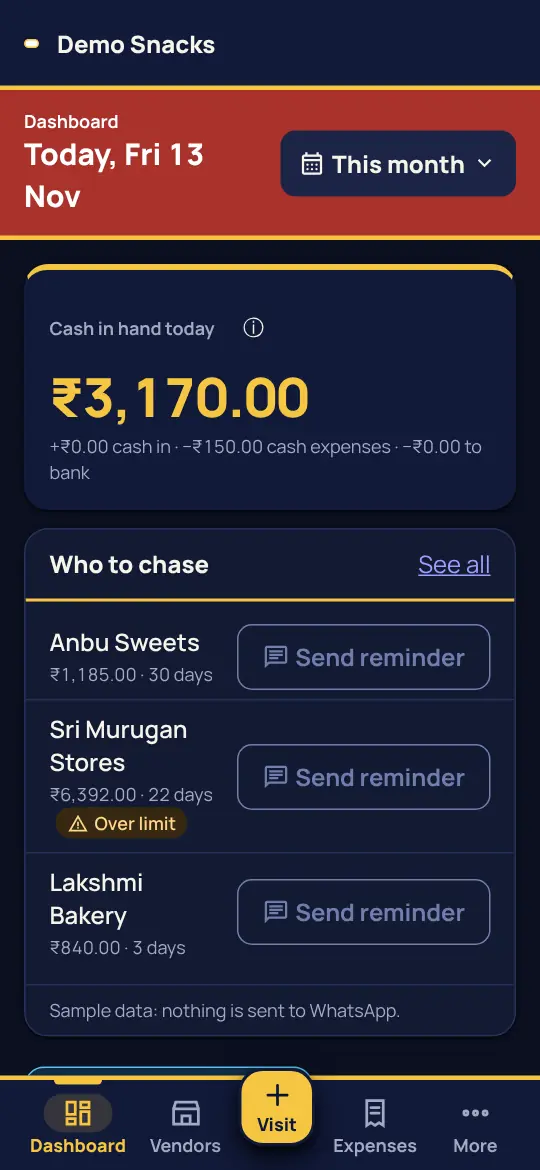
  8. Step 8: Know the cash in hand and who to chase

    The dashboard shows the cash that should be in the drawer and the shops with the oldest dues, with a reminder one tap away.

    The owner dashboard with cash in hand today and a Who to chase list with Send reminder buttons
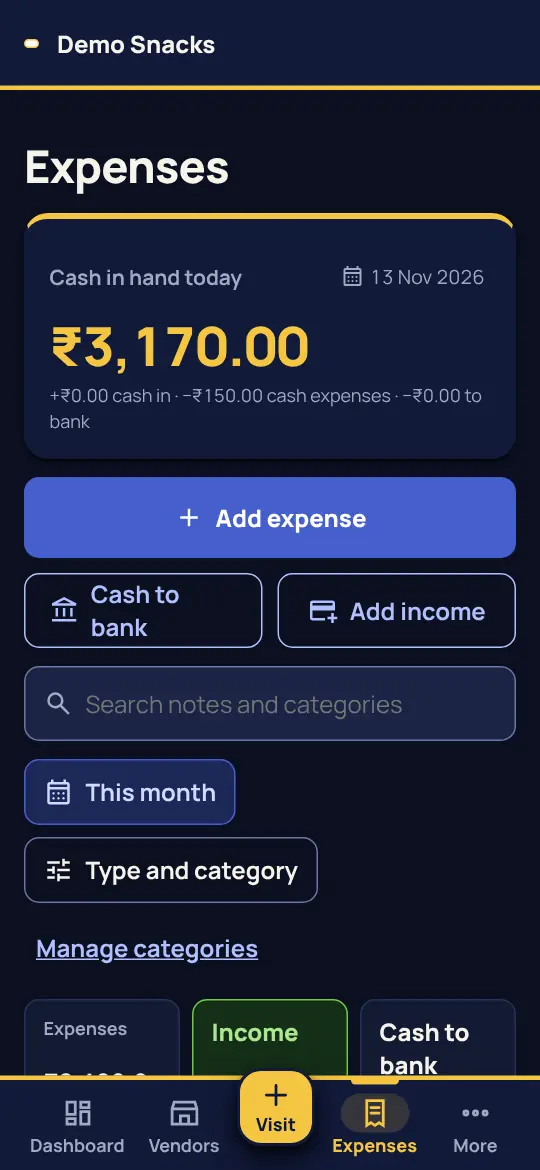
  9. Step 9: Keep expenses in the same place

    Ingredients, packaging, transport and cash deposited to the bank, so profit is counted after costs, not before.

    The expenses screen with cash in hand, buttons to add an expense, income or cash to bank, and a list of recent expenses

Built so the books stay straight

  • A visit saves completely or not at all, so nothing is left half-recorded.
  • Numbered documents are never deleted. A wrong entry is voided with a reason and entered again.
  • A payment can never be more than the shop owes.
  • Each delivery keeps the making cost of its day, so a later change never rewrites past profit.
  • Low-price and credit-limit warnings inform the owner but never block a sale.
  • The UPI QR code is made on the phone. There is no payment gateway: the owner records a payment after seeing it arrive.

Have a Similar Problem? Let's Talk It Through.

Your workflow will not be identical, and it does not need to be. Tell us what is slow, manual or missing, and we will tell you honestly whether something like this would help.

More use cases

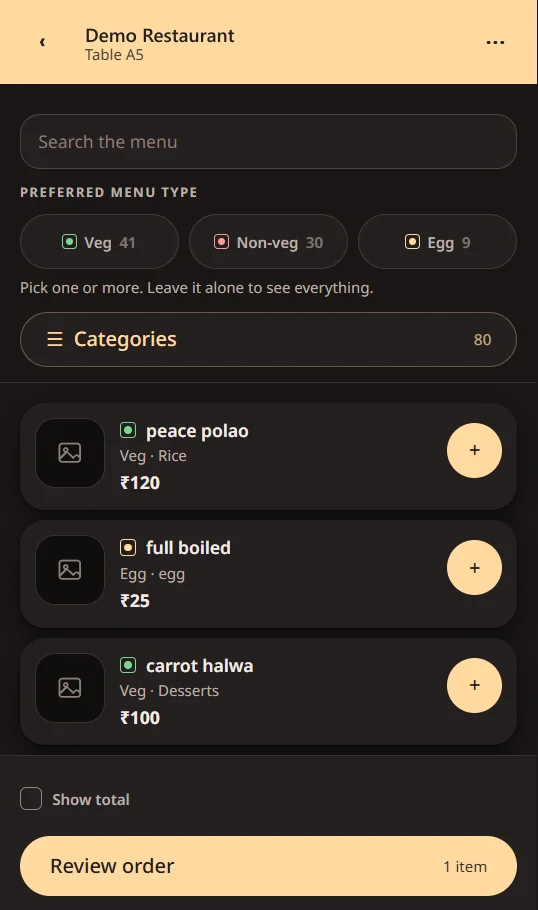
  • A restaurant's QR menu on a phone, with veg, non-veg and egg filters and dishes that can be added to the order

    Client project · Restaurant · Anonymised

    Make every table visit an opportunity to serve better.

    The problem: Guests need an easier way to browse, order and ask for service — without adding work for the floor team.

    What we built: A table-QR menu for ordering and service requests, with the floor team and the owner seeing the same requests the moment a guest taps.

    See how it works: Make every table visit an opportunity to serve better.
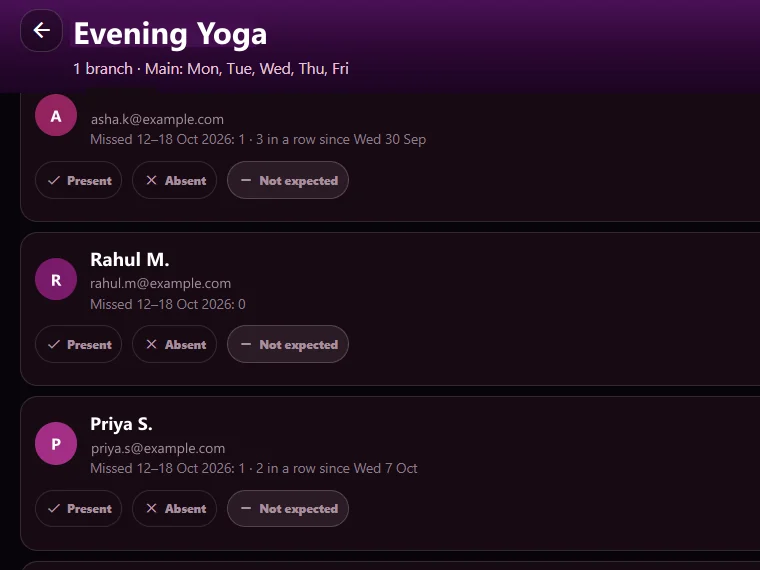
  • A course's attendance list showing each member's missed sessions and present, absent or not-expected marks

    Client project · Fitness academy · Anonymised

    Turn attendance records into proactive member engagement.

    The problem: Academies and fitness studios often notice repeated absences only after a member has already drifted away.

    What we built: Online-class attendance is imported, members who miss a set number of sessions are flagged, and course-wise reminder emails go out — with a record of every email sent, bounced or excluded.

    See how it works: Turn attendance records into proactive member engagement.
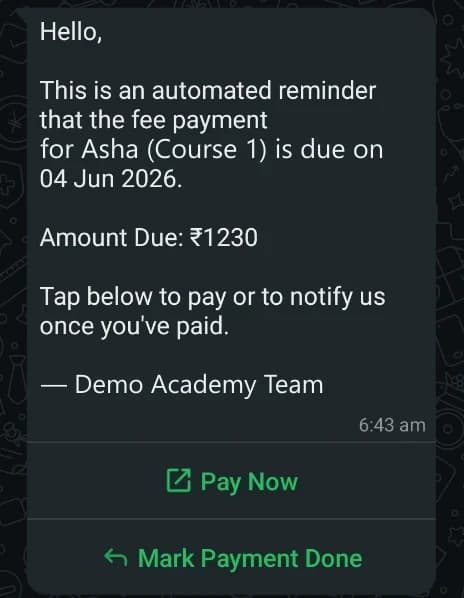
  • An automated WhatsApp fee reminder with the amount, the due date and Pay Now and Mark Payment Done buttons

    Our own product · UniqBrio

    Spend less time chasing fees.

    The problem: Manual follow-ups make it hard to keep track of due dates, payment status and new enquiries across courses.

    What we built: Course-wise payment tracking, WhatsApp reminders with a pay link, and a simple online path from enquiry to enrolment.

    See how it works: Spend less time chasing fees.
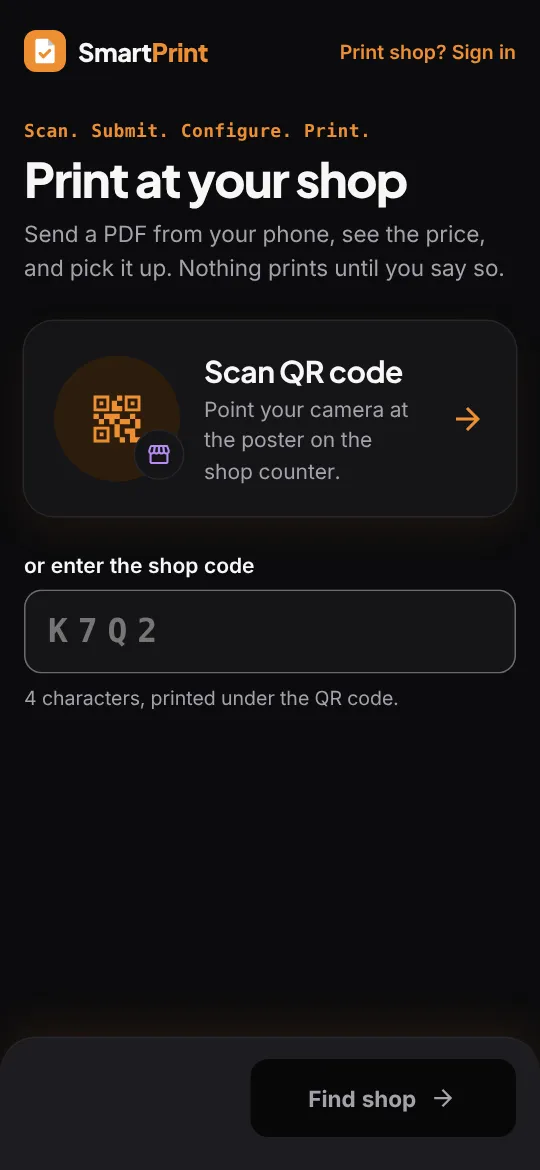
  • SmartPrint's start screen on a phone: scan the shop's QR code or enter its four-character shop code

    Our own product · SmartPrint

    Scan. Submit. Configure. Print.

    The problem: Print orders arrive on staff members' own WhatsApp and email. Each one means finding the file and asking how to print it, and customers' documents stay behind in personal chats.

    What we built: Customers scan the shop's QR code, upload a PDF, choose their print settings and see the price. The shop gets a confirmed, ready-to-print order.

    See how it works: Scan. Submit. Configure. Print.
  • Our own product · Relavya

    Private beta

    Remember everyone you meet. Follow up like you mean it.

    The problem: After an event you have cards, WhatsApp numbers and LinkedIn requests, but not what you talked about. A generic message feels awkward, so the follow-up waits and usually never happens.

    What we built: A private notebook of the people you meet at events. Save a person and one memory in seconds, then open a ready, personal follow-up in your own WhatsApp, LinkedIn or email.

    See how it works: Remember everyone you meet. Follow up like you mean it.